
Springe zum Inhalt


Die Originalversion von Social Phone Extractor steht auf dieser Seite zum kostenlosen Download zur Verfügung.

Im Folgenden beschreiben wir eine neue (fortgeschrittenere) Version von Social Phone Extractor, die Total Email Extractor heißt.

Social Phone Extractor ist ein leistungsstarkes und innovatives Programm, mit dem Sie die Seiten von Profilen, Posts und Artikeln durchsuchen und scannen können, die in Google / Bing / Yahoo indexiert sind und sich auf die wichtigsten sozialen Netzwerke wie Linkedin, Facebook, Twitter und Instagram beziehen, um sie dann zu erfassen und zu extrapolieren Telefonnummern (von Unternehmen, Fachleuten und Einzelpersonen).

Dieser Extraktor für soziale Telefonnummern ist sehr einfach zu verwenden. Geben Sie einfach einige Schlüsselwörter ein, führen Sie die Suche durch und beginnen Sie schließlich mit dem Extrahieren der Informationen. Um Daten und gültige Telefonnummern zu suchen und zu erfassen, können Sie hier einige Filter anwenden: Land, Stadt, Kategorie / Berufsbezeichnung, Firmenname und andere Schlüsselwörter.

Im Folgenden finden Sie eine detaillierte Schritt-für-Schritt-Anleitung, die Ihnen zeigt, wie Sie mit diesem „Social Scraper“ Telefonnummern und WhatsApp-Nummern extrahieren.

Laden Sie zuerst Social Phone Extractor herunter und installieren Sie es auf Ihrem WINDOWS-PC

Step 1. Starten Sie Social Phone Extractor

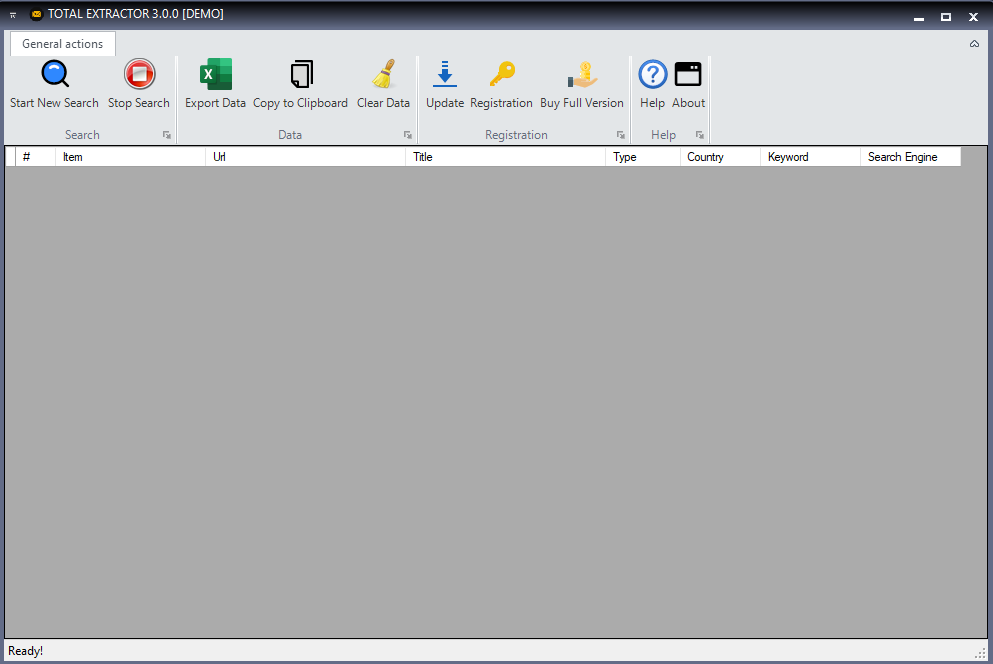
Installieren Sie das Programm auf Ihrem Computer. Nach dem Start wird der folgende Bildschirm angezeigt.
Step 2. Suche

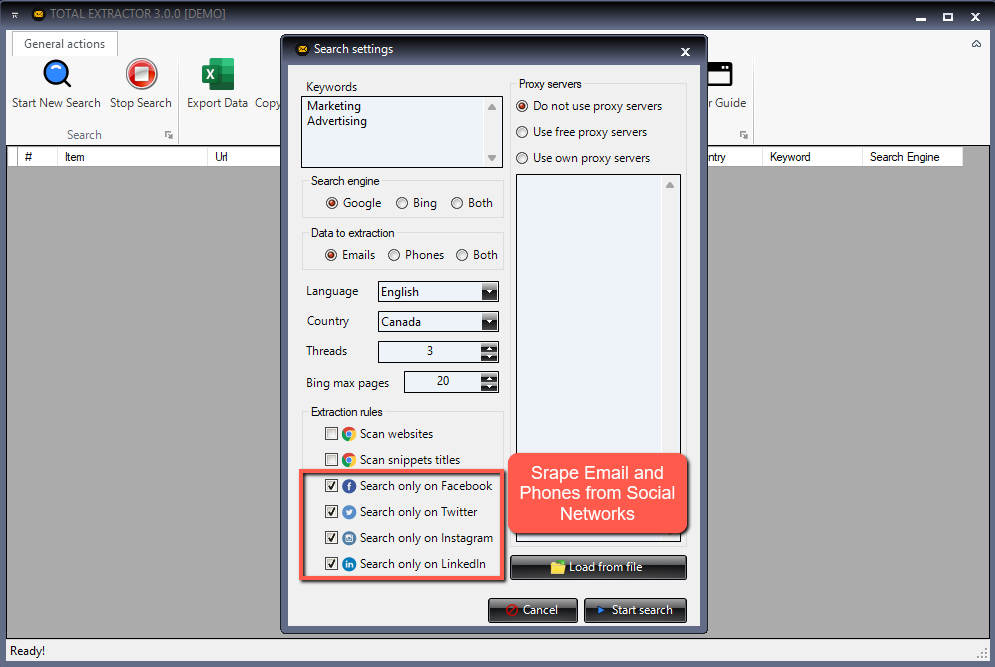
Geben Sie die Suchdaten ein.
Das erste Feld ist das des KEYWORD (suchen Sie beispielsweise nach “Consultants”, “Web Designer” oder “Hotel” usw.).
Das zweite Feld ist optional und bezieht sich auf den Ort (Stadt oder Land)
Das dritte Feld ist das zu untersuchende soziale Netzwerk (Facebook, LinkedIn, Twitter, Instagram oder das gesamte Web).
Das vierte Feld ist das Land, in dem gesucht werden soll, und sein „internationales Präfix“ (Ländercode).
Der fünfte Filter ist die Suchmaschine für die Suche nach E-Mail-Adressen (Google, Bing oder Yahoo).
Der letzte Filter bezieht sich auf WhatsApp: Durch Auswahl von JA können Sie die WhatsApp-Zahlen (größtenteils) extrapolieren.

Klicken Sie nach Eingabe der Daten auf SUBMIT
Step 3. Telefonnummern erfassen

Nachdem Sie auf SUBMIT geklickt haben, wird das Fenster mit den Suchergebnissen in der GOOGLE- (oder Bing- oder Yahoo-) Suchmaschine geöffnet. Klicken Sie zum Extrapolieren aller Telefonnummern und WhatsApp-Nummern wie in der folgenden Abbildung gezeigt auf GET DATA
Step 4. Telefonnummern extrapolieren

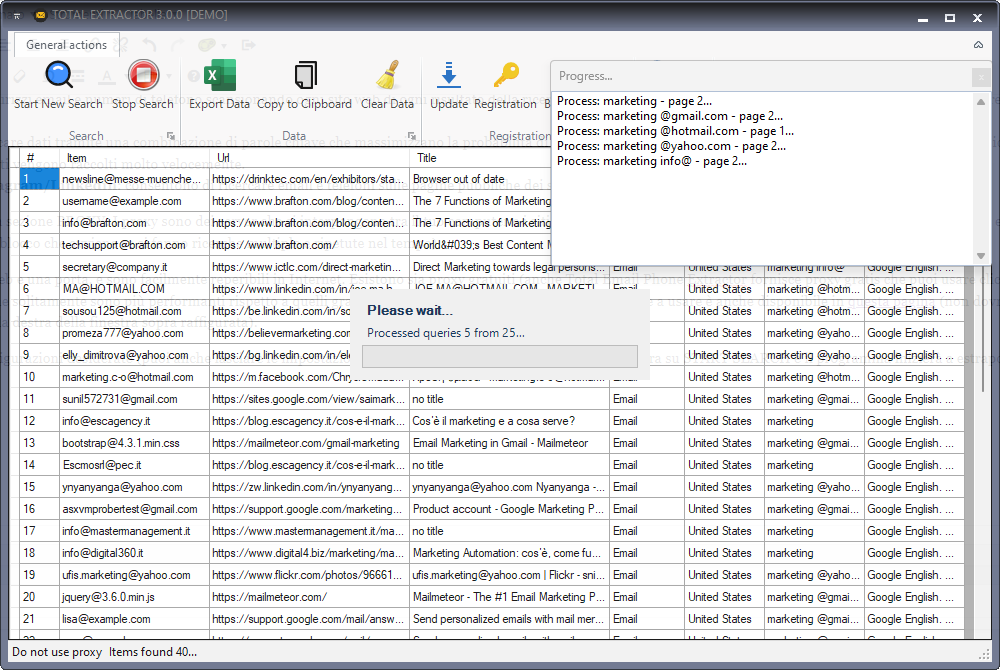
Die Software extrahiert automatisch Daten von Personen und Unternehmen mit ihren Telefonnummern und WhatsApp-Nummern. Alle Nummern werden im internationalen Format sein (mit internationalem Präfix vor der Nummer) und können auf anderen Plattformen verwendet werden (zum Beispiel zum Senden von SMS oder zum Versenden von WhatsApp-Nachrichten in großen Mengen).

Am Ende der Datenerfassung können Sie alle Ergebnisse auswählen und auf EXPORT klicken, um alles in einer CSV- oder EXCEL-Datei zu speichern. Standardmäßig ist das CSV-Format definiert. Sie können es jedoch ändern, indem Sie auf EINSTELLUNGEN zugreifen.

Wenn Ihnen die Demoversion des Programms gefällt, können Sie die Vollversion anfordern, indem Sie unten auf die Schaltfläche JETZT KAUFEN klicken. Sie erhalten eine 1-Jahres-Lizenz für die Vollversion (Sie können im Laufe des Jahres unbegrenzt viele E-Mails extrahieren).

Social Phone Extractor ist ein leistungsstarkes und innovatives Programm, mit dem Profilseiten, Beiträge und Artikel in den wichtigsten sozialen Netzwerken wie Linkedin, Facebook, Twitter und Instagram durchsucht und erfasst und anschließend Telefonnummern (von Unternehmen, Fachleuten und Einzelpersonen) erfasst und extrapoliert werden können ). Die Suche erfolgt bei 360 ° innerhalb der Seiten der verschiedenen sozialen Netzwerke und innerhalb der von Benutzern erstellten Beiträge.

Um eine große Anzahl von Telefonnummern (Festnetz-, Mobiltelefon- und WhatsApp-Nummern) zu erfassen, bietet das Programm mehrere Filter: Sie können beispielsweise nach Nummern suchen, indem Sie die bevorzugte Suchmaschine (Google, Bing, Yahoo) auswählen oder auswählen verschiedene Schlüsselwörter und / oder aktivieren Sie den WhatsApp-Filter. Alle extrahierten Telefonnummern sind zu 100% gültig und enthalten das internationale Präfix (z. B. +1 für die USA, um nicht mit internationalen Nummern zu verwechseln). Nach der Erfassung können Sie die Liste der Nummern auf Ihrem Computer in einer Excel-, TXT- oder CSV-Datei speichern.

TOTAL SOCIAL PHONE EXTRACTOR FULL VERSION:

Social Email Extractor ist ein neues Programm zum Extrahieren von E-Mails von Twitter- und Instagram-Profilseiten. Dieser leistungsstarke "Instagram & Twitter E-Mail-Extraktor" kann alle "öffentlichen" E-Mails aus sozialen Netzwerken (einschließlich Facebook und Linkedin) erfassen. Sie können nach jeder Kategorie oder jedem Schlüsselwort wie Personal Trainer, Restaurants, Modeblogger oder Hotels und an jedem Ort, in jeder Stadt, in jedem Bundesland oder in jedem Land suchen. Das Programm erhält automatisch alle E-Mail-Adressen (von Unternehmen und / oder Einzelpersonen) von Instagram- und Twitter-Profilen.

Laden Sie zunächst Social Email Extractor herunter und installieren Sie es auf Ihrem WINDOWS-PC:

ENGLISH USER GUIDE:

Step 1. Install the software on your computer. Run it and you’ll see this window:

Step 2. Add keywords and other search parameters

From the main screen of the program you have to fill in the following fields:

> The first field is that of the Keyword or Category (eg search for “Sport” or “Cinema” or “Fashion blogger” and so on).
> The second field (optional) is the LOCATION (for example, you can enter a city or region)
> The third field is the social network to scrape (here you have to select TWITTER or INSTAGRAM as shown in the figure below). This scraper is able to capture data also from Linkedin and Facebook.
> The fourth field is the search engine (Bing, Google or Yahoo) to use to search all Twitter and Instagram profiles from which you can extract public email addresses.
> The last filed is the “email address type“: you can search for “private” email with domain @gmail.com/@yahoo.com/@hotmail.com or “business” email.

After filling in all the fields you have to click on SUBMIT

Step 3. Get email addresses from Instagram and Twitter

After clicked on SUBMIT you will see the search results in BING (or Google or Yahoo). Now, to start the capture all email addresses from Twitter/Instagram profiles, simply click on GET DATA button as shown in the following image:

Step 4. Save email addresses

The program will automatically extract the email address from the Twitter/Instagram pages. The percentage of email addresses is very high and they are all 100% valid emails like @gmail.com, @yahoo.com and @hotmail.com.

Once finished you can click EXPORT to save all emails in a CSV or EXCEL file. By default the CSV format is set but you can change it by accessing SETTINGS:


Note: With the demo version the program will only extrapolate the first 35 results. In addition, the Export function is disabled.

If you like the demo version of the program, you can request the full version clicking on the BUY NOW in the program. You will receive a 1 Year license for the FULL version (you can extract unlimited emails during the year)

If you want to extract also phone numbers and whatsapp numbers from Twitter or Instagram, try Social Phone Extractor.

Die Originalversion von Social Email Extractor ist auf dieser Seite verfügbar.

Im Folgenden stellen wir eine neue und erweiterte Version des Programms vor. Diese neue Version von Social Email Extractor heißt TOTAL EXTRACTOR.

Total Email Extractor ist ein leistungsstarkes und innovatives Programm, mit dem öffentliche Seiten in den wichtigsten sozialen Netzwerken wie Linkedin, Facebook, Twitter und Instagram (die in Google / Bing / Yahoo indiziert sind) durchsucht und gescannt und anschließend E-Mail-Adressen (von Unternehmen) extrahiert werden können. Fachleute und Einzelpersonen).

Es ist auch möglich, die Suchmaschine auszuwählen, um die besten Ergebnisse zu erzielen, indem Sie eine zwischen Google, Bing und Yahoo auswählen. Alle erfassten E-Mails sind zu 100% gültig und haben die Erweiterung @ gmail.com, @ hotmail.com und @ yahoo.com.

Es ist auch möglich, nach geschäftlichen E-Mails zu suchen (z. B. [email protected]). Nach der Suche können Sie sie in einer Excel-, TXT- oder CSV-Datei auf Ihrem Computer abrufen und speichern.

Laden Sie die kostenlose Testversion über die folgende Schaltfläche herunter oder kaufen Sie die Vollversion ohne Einschränkungen jeglicher Art

[Verwendung] Social Email Extractor

#1. So extrahieren Sie E-Mails aus Linkedin

#2. So extrahieren Sie E-Mails von Facebook

#3. So kratzen Sie E-Mails von Twitter und Instagram

[Verwendung] Social Phone Extractor

#1. So extrahieren Sie Telefon- und WhatsApp-Nummern von Web


Video Tutorial

Screenshot Social Email Extractor:

Data Collection and Processing

The software developed by YpSpider extracts publicly available data, including email addresses, directly from web pages on users' local devices. It is important to note that:

  • Local Software: The software operates entirely locally on the user’s computer and does not use cloud platforms for data processing or storage.
  • Local Data: All extracted data is stored exclusively on the end user’s device. It is not collected, transferred, or saved to external servers or in the cloud.
  • Public Data: The data extracted from web pages is publicly accessible information on the internet, available in plain view to anyone. No protected or unauthorized data is processed.
  • Data from Personal Accounts: For software that extracts data from personal email accounts or social media accounts, the data remains solely on the end user’s device. It is not transferred, saved to external servers, nor collected or used by third parties.
  • No Data Collection on Our End: We do not have access to the data extracted by the user, and we do not store, collect, or use this information in any way.
  • Personal Use: The extracted data is for the exclusive use of the end user, who has full control over how it is managed and used.

Purpose of Data Processing

The software is intended exclusively for personal use, such as managing information extracted from public sources or from personal accounts, in compliance with applicable regulations. Any use of the extracted data is at the discretion of the end user and is under their sole responsibility.

User Rights

Users have the right to access, modify, and delete the data extracted by the software at any time, without any intervention on our part. Users maintain full control over the data on their device.

Disclaimer

The use of the software must comply with data protection laws, including the GDPR (General Data Protection Regulation) and the CCPA (California Consumer Privacy Act). YpSpider  is not responsible for any illegal or improper use of the software by users, such as unauthorized email sending or other activities that do not comply with applicable regulations. It is the user’s responsibility to ensure that the use of the software complies with all applicable laws and regulations.

Data Security

The software is designed to operate securely locally on the user’s device and does not introduce vulnerabilities or risks of exposure to personal data. It does not use connections to external servers nor transfer data to third parties.

Consent and Transparency

By using the software, the user expressly agrees to the terms described here and acknowledges that the data processing takes place exclusively on their own device and under their responsibility. No data is collected or processed by YpSpider .

Cookie Policy

If YpSpider ’s website uses cookies to track visits or for other purposes, these will be used in compliance with the applicable regulations. Users will be informed and, if required, can provide their consent to the use of cookies.

Privacy Policy Updates

We reserve the right to modify this privacy policy at any time. Changes will be communicated to users through our website. Users are advised to periodically review this section to check for any updates.

CCPA Compliance (California Consumer Privacy Act)

In compliance with the CCPA, users residing in California have the following rights:

  • The right to know what personal data is collected and how it is used.
  • The right to request the deletion of their personal data, if applicable.
  • The right not to be discriminated against for exercising these rights.

Since YpSpider does not directly collect personal data, these rights apply exclusively to any interactions with our website or related services.

Copyright and Intellectual Property

The content on this site, including text, images, logos, and screenshots of third-party websites, is protected by copyright and intellectual property laws. All registered trademarks and logos shown belong to their respective owners.

This site may mention third-party websites and display screenshots of such sites along with their logos. These are used solely for informational purposes and to facilitate access to useful resources. We have no control over these sites and assume no responsibility for their content or the use made of it.

If you are the owner of a trademark or content displayed on our site and wish to discuss copyright-related issues, we invite you to contact us.


REFUND POLICY

All software on YpSpider is offered in a Trial/Free Trial version, allowing you to test the functionality and evaluate the quality of our product before purchasing a license.

This is why at YpSpider, WE DO NOT OFFER REFUNDS. No refunds will be granted except in the following circumstances.

Accepted Circumstances

YpSpider offers refunds under the following circumstances according to its money-back guarantee guidelines:

  • Purchase of a "wrong product." In this case, we will assist you in purchasing the correct product from our website.
  • Duplicate purchase of the same product. In this case, YpSpider will refund one of the products or swap a program with another product available in our catalog.

By accessing this website, you agree to these terms and conditions. YpSpider reserves the right to take legal action for any violation of these terms and conditions.

All rights not expressly granted are reserved.

There are inherent risks in using any Software available for download on the Internet, and YpSpider wants to remind you to ensure that you fully understand all risks before downloading any Software (including, but not limited to, the potential infection of your system with computer viruses and data loss). You are solely responsible for adequate protection and backup of data and equipment used in connection with any software.